
Business Profile for Wulan
Wulan reads the business profile when it answers your questions and when it suggests replies in the Inbox. The profile is used only in your workspace.
What you need
- The Owner or Admin role in the workspace. Other roles can only view this page.
Open the page
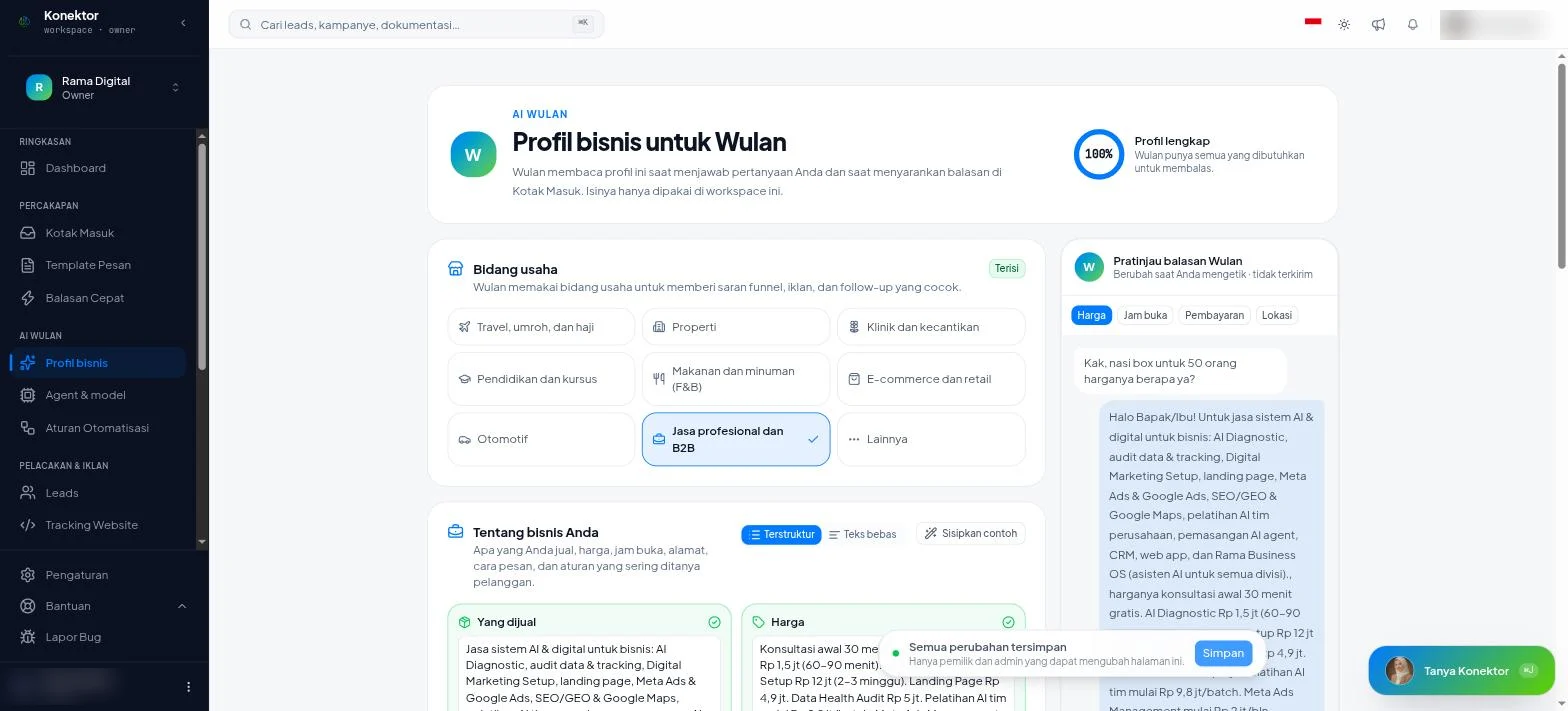
Open Wulan AI > Business profile in the sidebar.
The ring at the top shows how complete the profile is: Profile not complete, Almost complete, or Profile complete. The Not filled in yet list names the parts that are still empty.
Steps
- Choose an Industry. Wulan uses it to suggest funnels, ads, and follow-ups that fit.
- Fill in About your business. See Two ways to fill it in.
- Fill in How Wulan should reply. See How Wulan should reply.
- Check the Wulan reply preview on the right.
- Click Save.
After the save, the page shows "Profile saved. Wulan uses the latest version."
If Wulan prepares a profile draft in chat, check and enter it on the Business profile page. Then click Save. Chat does not save profile changes, including after you confirm in chat.
Two ways to fill it in
The About your business section has two modes.
| Mode | How it works |
|---|---|
| Structured | Fill in six fields: What you sell, Prices, Service hours, Location and how to order, Payment, and Cancellation, warranty, or delivery rules. |
| Free text | Write all details in one box. Use one "Label: value" line per item so Wulan can read it. |
Click Insert example if you need a sample.
Text that does not fit the six fields stays saved. Click Open Free text to change it.
How Wulan should reply
| Field | What to enter |
|---|---|
| Tone | Choose Friendly, Formal, or Casual. Each option shows a sample sentence. |
| How to address customers | The greeting Wulan uses, for example "Kak". |
| Always ask | Items Wulan asks about before it answers, for example the event date. Type, then press Enter. |
| Never promise | Items Wulan must not promise, for example an extra discount. Type, then press Enter. |
| Extra notes | Optional. Other instructions for Wulan. |
Wulan reply preview
The preview changes as you type. The preview is never sent to anyone.
Choose a sample customer question, for example Price or Opening hours. When the profile has no data for that question, the preview names the empty part. Fill in the missing information before you use the reply.
Quick Replies are used too
Wulan also reads your team's Quick Replies for its suggestions. The more complete your quick replies are, the better the suggestions become.
Result
The Wulan reply suggestion card in the Inbox uses this profile. The card names its sources, for example "based on Business profile & 3 quick replies".
To choose the AI model and turn on auto-reply, read Agentic.
Troubleshooting
| Text on screen | What to do |
|---|---|
| "The text is too long. Shorten it before you save." | Shorten the text, then click Save again. |
| "This list is too long. Remove or shorten another item first." | Remove or shorten items in Always ask or Never promise. |
| "Not saved. Try again." | Click Save again. |
| "Leave this page?" | Choose Stay here, then save. Choose Discard changes only if you do not need the changes. |
Related links
Need More Help?
Our team is ready to help you maximize ad tracking and business attribution.
Try or continue
© 2026 Konektor. All rights reserved.