
How to connect Repliz to Konektor in 1 minute (Indonesian narration)
How to connect Repliz to Konektor in 1 minute (Indonesian narration) • 1:03
Tonton di YouTubeRepliz Integration
Connect your Instagram account and Facebook Page in Repliz to Konektor. DMs from both channels go to the same Inbox as WhatsApp. New comments from Facebook, Instagram, Threads, TikTok, YouTube, LinkedIn, and X also go there. Your team reads and replies from one place.
What You Get
- Instagram and Messenger DMs show in the Inbox, with your WhatsApp conversations. The channel label is Instagram or Messenger.
- Your team replies to DMs from the Inbox. Replies can contain text or JPEG/PNG images.
- When Auto-reply in Agentic is on, the AI agent also replies to Instagram and Messenger DMs. The agent sends its reply directly to the customer.
- New comments from the 7 platforms that you connect in Repliz show in the Inbox. Each comment becomes its own conversation. Read Comments from 7 platforms.
- Each new DM sender becomes one lead in Leads. The lead has no phone number.
- When Meta includes ad data in the DM, the lead has the source ads. When the lead status changes, Konektor sends an event to Meta.
- A comment does not become a lead. A comment does not send an ad event to Meta.
Summary
| Item | Detail |
|---|---|
| Channels | Instagram DMs and Facebook Messenger, and comments from Facebook, Instagram, Threads, TikTok, YouTube, LinkedIn, and X |
| Cost | Gold plan in Repliz, from IDR 49,000 for 1 month. You pay Repliz directly. |
| You copy from Repliz | Access Key and Secret Key |
| You paste in Repliz | The URL and Token from Konektor |
| DM replies from Konektor | Text or JPEG/PNG images up to 5 MiB, within 24 hours after the last customer message |
| Comment replies from Konektor | Text only. The reply is public under the comment. The 24-hour limit does not apply. |
| Accounts per integration | One integration holds the accounts you pick in Repliz, at most 20 accounts |
| Quota in Konektor | One Repliz integration counts as one partner integration in your plan |
DM or comment
Konektor receives two types of messages from Repliz. You reply to them in different ways.
| Item | DM | Comment |
|---|---|---|
| Platforms | Instagram and Facebook (Messenger) | Facebook, Instagram, Threads, TikTok, YouTube, LinkedIn, and X |
| Label in the Inbox | Instagram or Messenger | Facebook comment, Threads comment, and so on |
| One conversation holds | All messages from one person | One comment |
| Who sees your reply | Only the DM sender | Everyone who opens the post |
| Reply content | Text or JPEG/PNG images | Text only |
| Time limit to reply | 24 hours after the last customer message | None |
| Goes to Leads | Yes, one lead for each sender | No |
| Ad event to Meta | Yes, when the DM carries ad data | No |
| Ignore button | No | Yes, until you reply |
| Agent auto-reply | Follows Auto-reply | Needs Auto-reply and Reply to public comments |
Threads, TikTok, YouTube, LinkedIn, and X send comments only. DMs from these platforms do not come to Konektor.
Move private talk to a DM
Everyone can read a comment reply. Do not write a phone number, an address, a special price, or payment details in a comment reply. Ask the customer to send a DM to your Instagram account or Facebook Page.
About Repliz
Repliz is a tool to manage comments and DMs on social accounts. You sign up and pay Repliz directly, not through Konektor. Konektor uses two keys from your Repliz account.
How it works:
- A customer sends a DM to your Instagram account or Facebook Page.
- Repliz receives the DM.
- Repliz sends the DM to Konektor through a webhook. A webhook is a destination address that you enter in Repliz.
- Konektor shows the DM in the Inbox and creates a lead.
Comments use the same flow. Konektor shows the comment in the Inbox, but does not create a lead.
Konektor uses two things from Repliz:
- Instagram DMs and Facebook Messenger.
- New comments from Facebook, Instagram, Threads, TikTok, YouTube, LinkedIn, and X.
DMs from other platforms are not in Konektor. Post schedules in Repliz do not go to Konektor. Shopee and WhatsApp through Repliz are not in the account list.
Prerequisites
Before you start, get these items:
- An active Repliz account.
- The Gold plan in Repliz. Step 1 shows how to check it.
- An Instagram professional account (Business or Creator), or a Facebook Page that you manage.
- Access to Konektor as the Owner or Admin of your workspace.
- For ad tracking: an active Meta platform in Website Tracking (see Step 7).
Repliz display language
This guide uses Repliz in English. If your Repliz menu uses another language, click the language button at the bottom left of the screen. Select English.
Step 1: Check or buy the Gold plan in Repliz
The chat feature is open only on the Gold plan. Check your plan first.
No Repliz account yet? Sign up for Repliz. This is a Konektor referral link.
- Sign in to the Repliz dashboard.
- Look at the account card at the bottom left of the screen. The card shows the name of your plan.
- If it says Gold, go to Step 2.
- If it does not, click Upgrade in the left menu, in the Other section.
- On the Plan tab, select Gold.
- Under Select a Period, select one period.
- Under Payment Method, select Duitku (QRIS, VA, e-wallet) or PayPal (credit card).
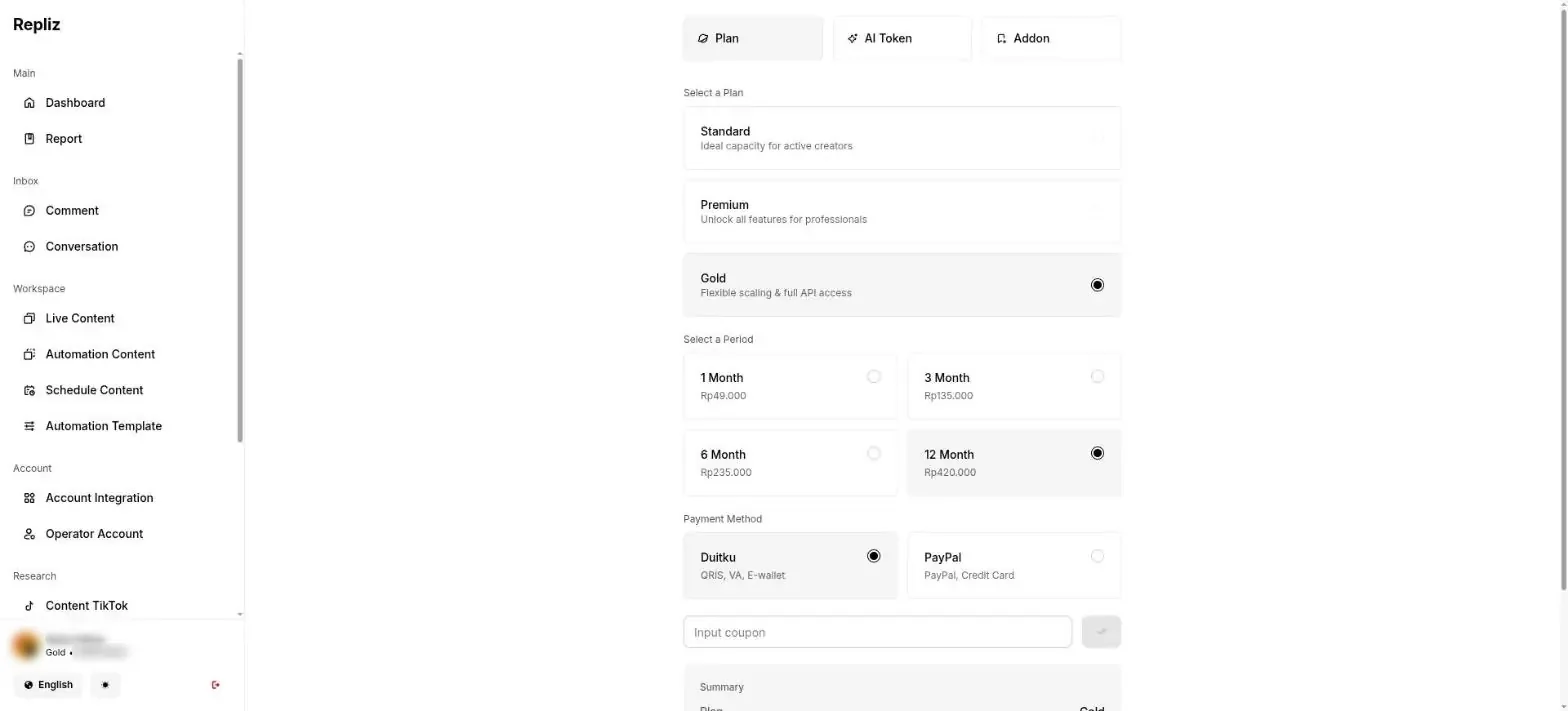
- Follow the payment screens to the end. The account card shows Gold after the payment succeeds.
| Gold plan period | Price |
|---|---|
| 1 month | IDR 49,000 |
| 3 months | IDR 135,000 |
| 6 months | IDR 235,000 |
| 12 months | IDR 420,000 |
These prices are valid on 30 September 2026. Repliz can change its prices. Check the Upgrade page before you pay.
Step 2: Connect your Instagram and Facebook accounts in Repliz
Skip this step if your account already shows in Account Integration.
- Click Account Integration in the left menu.
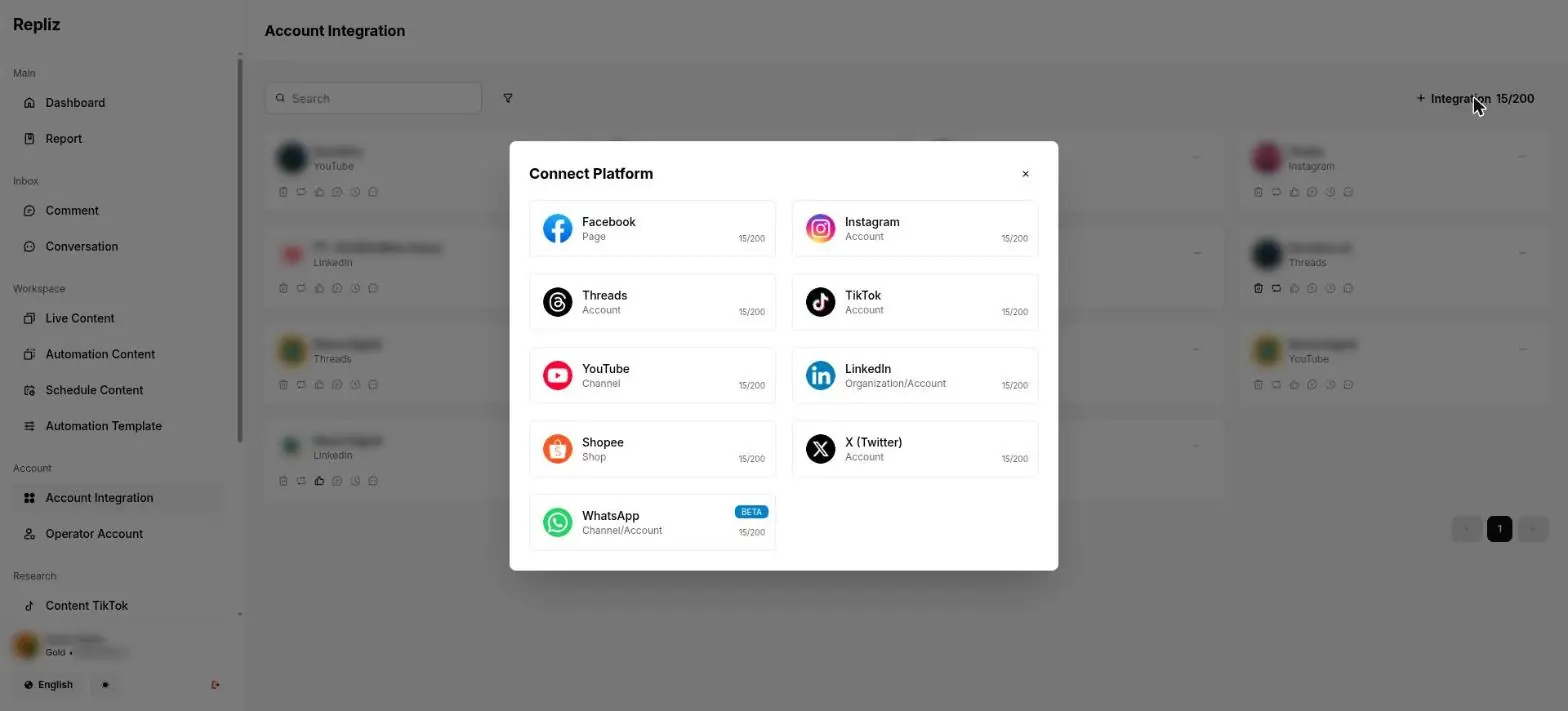
- Click + Integration at the top right. The number next to it, for example 15/200, shows the accounts in use and the limit.
- In the Connect Platform window, click the platform that you want to connect. For DMs, pick Facebook (Page) or Instagram (Account). For comments only, you can also pick Threads, TikTok, YouTube, LinkedIn, or X.
- Sign in with the Facebook or Instagram account that you manage.
- Select the Page or account that you want to connect. Allow all the permissions that Repliz asks for.
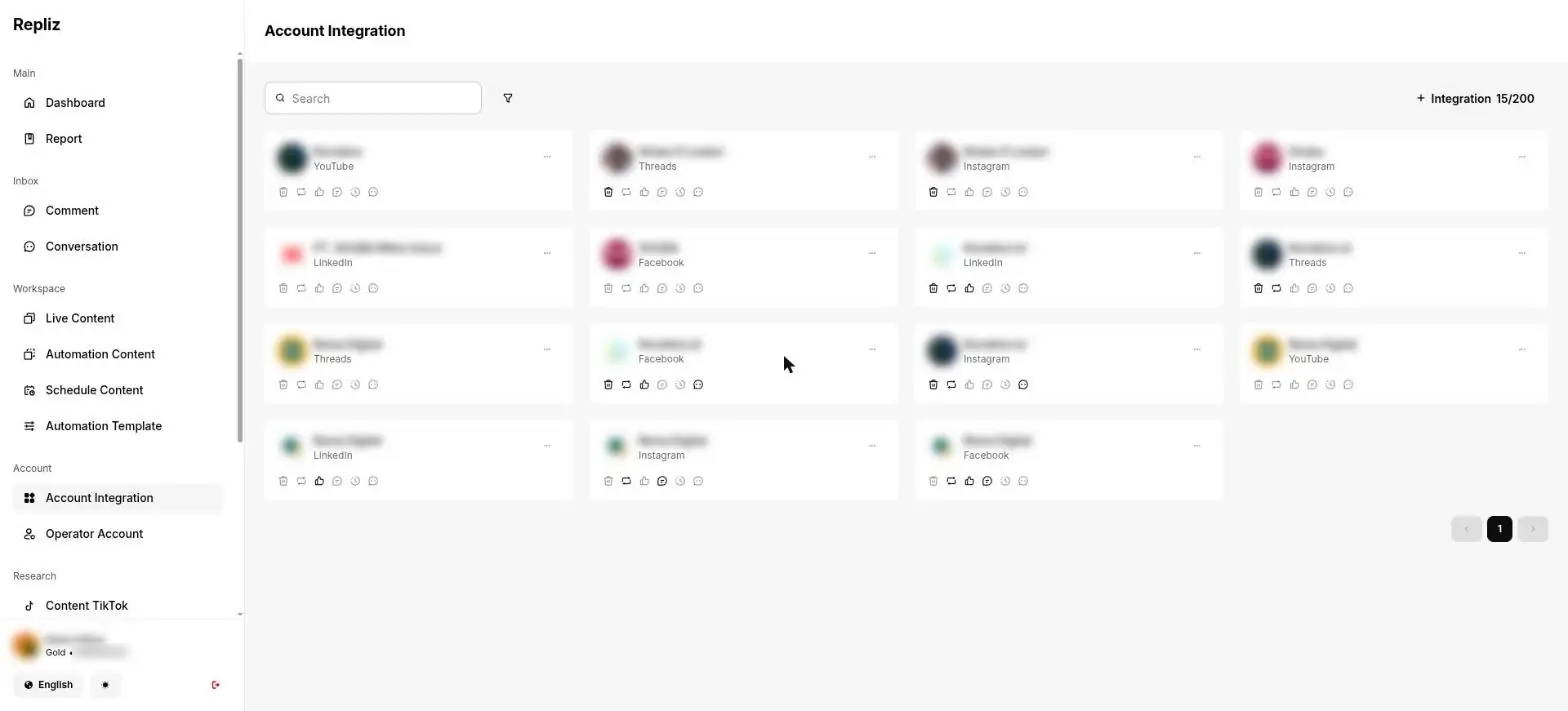
- Go back to Account Integration. The new account shows in the list, and the platform name is under the account name.
A personal account cannot connect
Repliz accepts a Facebook Page, not a personal profile. Repliz also accepts only an Instagram professional account. Change the account type in the Instagram app: Settings and activity > Account type and tools > Switch to professional account. The menu can look a little different between app versions.
Step 3: Get the Access Key and Secret Key
You copy the two keys one at a time. Paste each key in Konektor before you copy the next key.
- In the left menu of Repliz, click Setting (in the Other section). The settings menu opens.
- Click Public API.
- Find the Access Key and Secret Key fields at the top of the page.
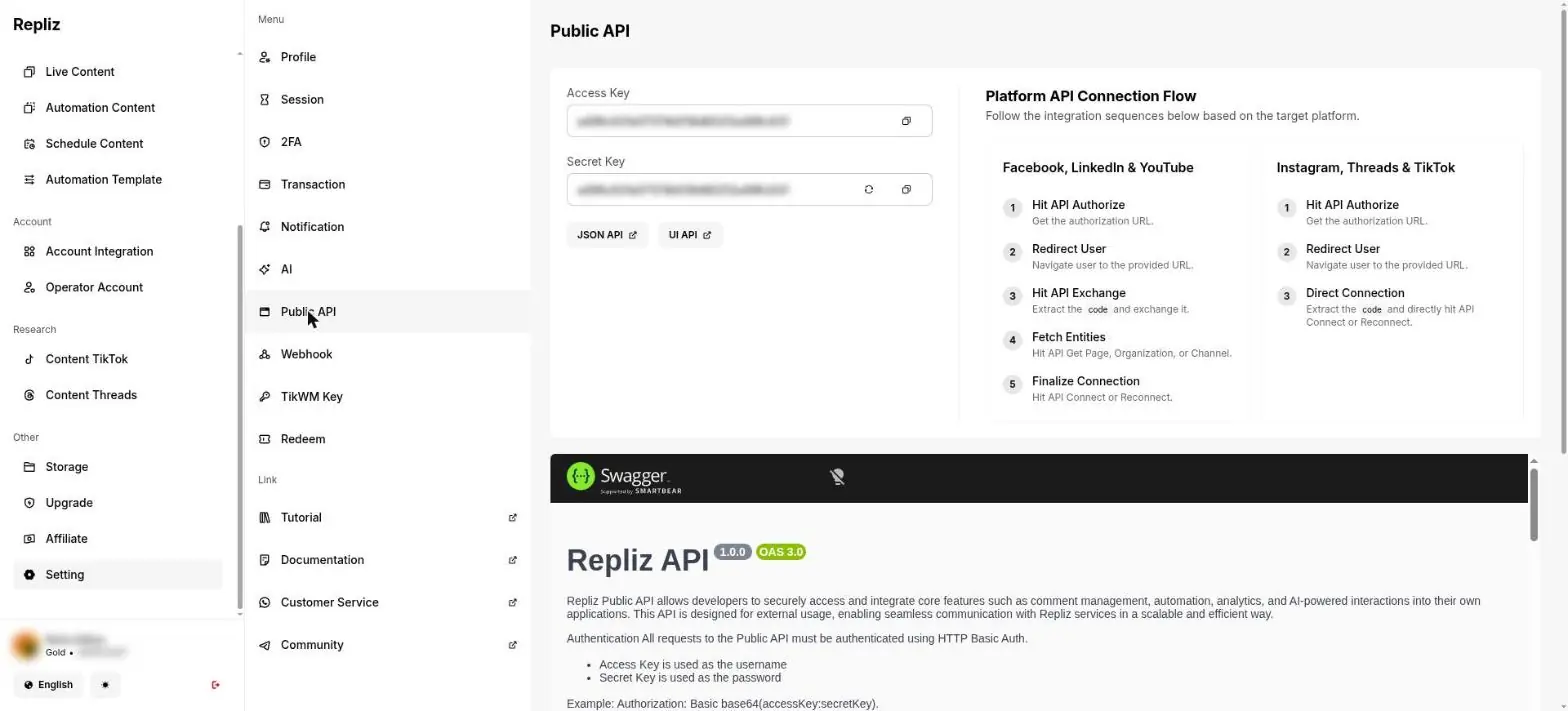
- Click the copy icon at the end of the Access Key field.
- Do not copy the Secret Key now. Go to Step 4.
Keep the keys secret
The Access Key and Secret Key give full access to your Repliz account. Do not share them. Do not click the round arrow icon next to Secret Key. That icon makes a new Secret Key, and the old key stops working at once.
Step 4: Paste the keys in Konektor
- Open Konektor in a new tab. Sign in as the Owner or Admin.
- Open Settings > Integrations.
- Find the Repliz card. Click Connect. The Add Partner Integration form opens with Repliz selected.
- Enter a name that you can recognize in Integration Name, for example
My Shop DMs. - Paste the Access Key in Access Key.
- Go to Repliz. Click the copy icon at the end of the Secret Key field.
- Go back to Konektor. Paste the Secret Key in Secret Key.
- In the Accounts for the Inbox section, click Find accounts. Konektor shows the Instagram, Facebook, Threads, TikTok, YouTube, LinkedIn, and X accounts from your Repliz account.
- Tick the accounts whose DMs or comments you want to receive. Pick at least one account and at most 20 accounts.
- Click Connect.
The One more step in Repliz window opens. Keep that window open and go to Step 5. The new Repliz card shows Pending until the first DM arrives.
Notes:
- If only one account can be picked, Konektor ticks it and fills in Integration Name for you.
- An account that another Repliz integration already uses cannot be picked. The reason is written under the account name.
- Konektor does not show the two keys again after you save them.
Step 5: Paste the URL and token in Repliz
Konektor cannot fill in the webhook in Repliz for you. You paste the URL and token yourself.
- In the One more step in Repliz window, click Copy next to URL.
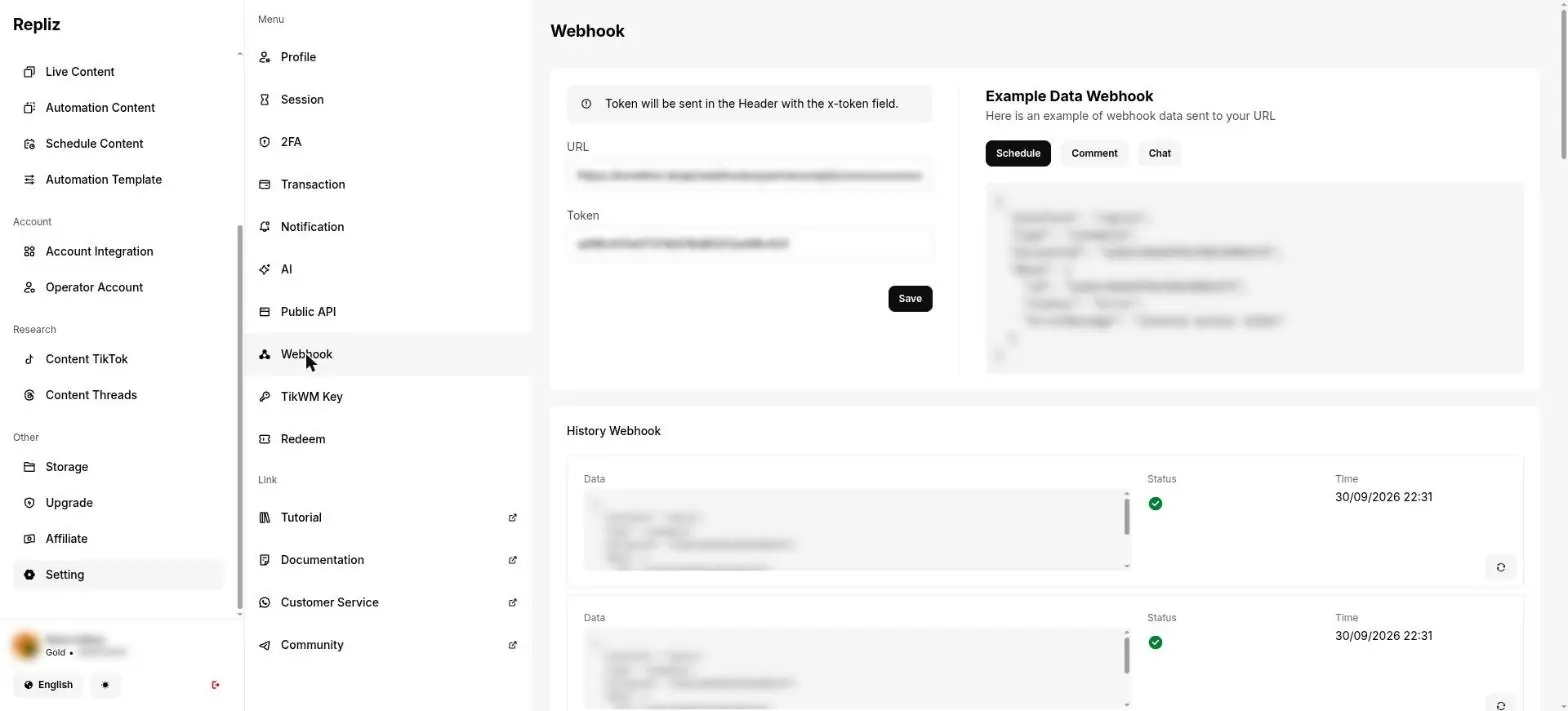
- Go to Repliz. Open Setting > Webhook.
- Paste the URL in the URL field.
- Go back to Konektor. Click Copy next to Token.
- Go to Repliz. Paste the token in the Token field.
- Click Save.
- Go back to Konektor. Click Got it to close the window.
The History Webhook section in Repliz records each delivery. A delivery that succeeds has a green check mark.
If the window in Konektor is already closed, open Settings > Integrations. Click URL and token on the Repliz card.
Lost or leaked token
On the Repliz card, click URL and token. Click Make a new token. Click Yes, make a new token to confirm. The old token stops working at once. Paste the new token in Repliz. Click Save.
Step 6: Send a test DM and find it in the Inbox
- From another Instagram or Facebook account, send a DM to the account that you connected. Write a short text, for example
hello. - In Konektor, open Conversations > Inbox. The new conversation shows with the label Instagram or Messenger.
- Open the conversation. Reply with text.
- Open the Instagram or Messenger app on the sender account. Your reply shows there.
- Open Settings > Integrations. The Repliz card shows Connected and the Last DM time for that account.
The next DMs from the same person go to the same conversation and the same lead. Photos, videos, and voice messages show as labels such as [Image], [Video], and [Audio]. Open the Instagram or Messenger app to see the file.
A reply that is sent outside Konektor, for example from the Instagram app or from the Repliz dashboard, can also show in the same conversation with the label Sent from another device.
Step 7: Run a Click-to-Message ad and check the source
A Click-to-Message ad opens a Messenger or Instagram Direct chat when a person clicks your ad. Konektor reads the ad data when Meta includes it in the DM.
- Make sure the Meta platform is active in Website Tracking. If it is not, follow Setup Meta Conversions API (CAPI).
- In Meta Ads Manager, create a Click-to-Message ad. Select Messenger or Instagram as the chat destination.
- Use the same Facebook Page or Instagram account that you picked in Step 4.
- From another account, click the ad. Send one DM in the chat that opens.
- In Konektor, open Leads. A lead from the ad shows the source ads. A lead from a normal DM shows the source social.
- Open Conversion > Sync Logs. The status
acceptedmeans Meta accepted the event from that lead.
Without an active Meta platform, no event goes to Meta. The lead is still saved and shows in Leads.
Comments from 7 platforms
The Inbox shows new comments from seven platforms that you connect in Repliz: Facebook, Instagram, Threads, TikTok, YouTube, LinkedIn, and X. Pick the accounts of these platforms in the Accounts for the Inbox section (Step 4).
The Repliz Gold plan is still necessary.
Test a comment
- From another account, write a comment on a post of the account that you connected.
- In Konektor, open Conversations > Inbox. The new conversation shows with the platform comment label, for example Threads comment.
- Open the conversation. Reply with text.
- Open the post in its app. Your reply shows under that comment.
A new comment usually shows in a few seconds. If it does not show yet, wait up to 10 minutes.
How a comment conversation looks
- Each comment becomes its own conversation.
- The channel label names the platform: Facebook comment, Instagram comment, Threads comment, and so on.
- The short title or caption of the post shows at the top as context.
- A comment does not need an ad ID, a visitor code, or a phone number to show or to get a reply. A DM does not need them also.
Reply to a comment
- Open the comment conversation in the Inbox.
- Write your reply. A comment reply is text only. Images, voice messages, files, and templates are not available.
- Send the reply.
The reply is public. It shows under that comment on the original platform. Anyone who opens the post can read it. After the reply is sent, Repliz marks the comment as done.
The 24-hour limit does not apply to comments. It applies only to Instagram and Messenger DMs.
Ignore a comment
A comment conversation that has no reply from Konektor has an Ignore button.
- Click Ignore.
- Konektor marks the comment as ignored in Repliz and closes the conversation.
This button does not delete the comment. It does not like the comment. If it fails, the conversation stays open. Click Ignore again.
Late comments
Repliz sends new comments to Konektor. Konektor also checks for new comments on a regular basis, about every 10 minutes. A comment that arrives late still comes in.
A comment is not a lead
A comment does not create a lead in Leads. A comment does not send an ad event to Meta. A DM keeps the lead rules that this page describes.
Auto-reply for comments
The AI agent can reply to public comments. This feature is off by default. Turn it on in Agentic with the Reply to public comments switch.
Send an image from the Inbox
Image sending requires the Storage Addon on your Repliz account, in addition to the Gold chat plan.
- Open an Instagram or Messenger conversation in the Inbox.
- Select a JPEG or PNG image with the attachment button.
- Use a file of 5 MiB (5,242,880 bytes) or less.
- Add a caption if necessary.
- Send the image.
You can also paste an image from the clipboard. Repliz does not send videos, audio, documents, stickers, or voice messages.
If the message says delivery is uncertain, check the conversation in Instagram, Messenger, or Repliz before you send another message. The retry button is unavailable for this result to prevent duplicate messages.
Fix Problems
DMs are not arriving
A Repliz card with the status Connected shows the link Not receiving DMs? Follow the recovery steps. The link shows when an account has no DM, or its last DM is more than 3 days old.
Check in this order:
- In Repliz, click Conversation (in the Inbox section). Look for your test DM.
- If the DM shows in Conversation but not in Konektor, open Setting > Webhook in Repliz. Make sure the URL and token are the same as in Konektor. Make sure you clicked Save.
- Look at the History Webhook section. The newest deliveries must have a green check mark. If you made a new token, paste that token in Repliz again.
- In Konektor, click Manage accounts on the Repliz card. Make sure the account is ticked.
- If the DM does not show in Conversation in Repliz, the problem is between Instagram or Facebook and Repliz. For Instagram, follow the recovery below. For Messenger, click Reconnect for that Page in Account Integration.
Instagram account recovery
The symptom: the Instagram account shows as connected in Repliz, but new DMs do not reach Repliz and Konektor. The message access permission in Instagram can be off. Turn it on. Then connect the account again in Repliz.
In the Instagram app on your phone, sign in as the professional account that you connected:
- Open Profile. Tap the ☰ menu at the top right.
- Tap Settings and activity.
- Tap Messages and story replies.
- Tap Message controls.
- Under Connected tools, turn on Allow access to messages.
Then in Repliz:
- Open Account Integration. Find that Instagram account.
- Click the ... menu on that account card. Click Reconnect. The ... menu is at the top right of each account card.
- Sign in with the same Instagram account. Allow all the permissions that Repliz asks for.
- From another account, send one test DM. The DM shows in Conversation in Repliz, then in the Inbox in Konektor.
The menus in Instagram and Repliz can look a little different between versions.
The last DM time is empty
The Repliz card shows No DM received when no DM has reached Konektor. The Connection > Connection Status page shows the same note for each account.
- Send one test DM from another account (Step 6).
- Reload the Integrations page.
- If the note stays empty, follow the checks in DMs are not arriving.
The plan is not Gold
Konektor shows this message when your Repliz plan does not include chat:
Your Repliz plan does not include chat. Activate the Gold plan in Repliz, then try again.
Activate the Gold plan in Repliz (Step 1). Then click Find accounts again in Konektor.
A reply is rejected after 24 hours
This rule applies only to Instagram and Messenger DMs. Comments have no 24-hour limit.
Instagram and Messenger allow a DM reply only within 24 hours after the last customer message. A DM has no template to open the conversation again. Konektor shows this message under the reply:
Not sent. The customer has not written in the last 24 hours. Reply after the customer writes again.
Wait until the customer writes again. Then reply from the Inbox as usual.
Other replies that are not sent
Konektor shows one of these messages under the failed reply:
| Message in Konektor | Cause | What to do |
|---|---|---|
| Not sent. You can reply to this contact only after the customer writes again. | Konektor has no conversation to reply in for this contact. | Wait until the customer writes again. Then reply from the Inbox. |
| Not sent. The chat provider is not responding. Send it again in a few minutes. | Repliz has a problem. | For a known failure, wait a few minutes. Click Try again only when the button is available. |
Other messages when you connect an account
| Message in Konektor | Cause | What to do |
|---|---|---|
| Repliz did not accept this Access Key or Secret Key. Copy them again from the Repliz dashboard. | The key is wrong, cut short, or replaced. | Copy both keys again from Setting > Public API (Step 3). |
| Repliz is not responding. Try again in a few minutes. | Repliz has a problem. | Wait a few minutes. Click Find accounts again. |
| This Repliz account has no Instagram or Facebook account. Connect one in Repliz first, then search again. | Repliz has no account that Konektor can use. | Connect an account in Repliz (Step 2). Click Find accounts. |
| Reconnect this account in Repliz first. | The account connection in Repliz is broken. | Click Reconnect in Account Integration. Click Find accounts. |
| Another Repliz integration already uses it. | Another integration in this workspace already uses the account. | Pick another account, or delete the old integration. |
| This account is already connected to another workspace. | Another workspace uses the account. | Remove the account from the integration in the other workspace, or use another account. |
| That account is not in your Repliz. Find the accounts again. | You removed the account in Repliz. | Click Find accounts again. Pick an account from the list. |
| Pick at least one account. | No account is ticked. | Tick one account or more. |
| One integration holds at most 20 accounts. Clear some accounts, then try again. | You ticked more than 20 accounts. | Clear ticks until 20 accounts or fewer remain. Click Connect or Save accounts again. |
Manage the Integration After You Connect
Open Settings > Integrations. The Repliz card has these buttons:
| Button | Function |
|---|---|
| URL and token | Shows the URL and token again. The Make a new token button is in that window. |
| Manage accounts | Adds or removes accounts. Click Save accounts to save. Accounts that are not ticked are removed. |
| Pencil icon | Replaces the Access Key and Secret Key. Fill them in only if you made new keys in Repliz. |
| Trash icon | Deletes the integration. Konektor asks you to confirm. You cannot undo this action. |
Next Steps
Need More Help?
Our team is ready to help you maximize ad tracking and business attribution.
Try or continue
© 2026 Konektor. All rights reserved.