
How to trace WhatsApp chats back to the ad with the visitor code (1 minute, Indonesian narration)
How to trace WhatsApp chats back to the ad with the visitor code (1 minute, Indonesian narration) • 0:59
Tonton di YouTubeWhatsApp Links
A WhatsApp Link creates one link that sends prospects to team members' numbers. Konektor selects a destination before the WhatsApp app opens.
No QR scan required
Enter destination numbers manually. A WhatsApp Link does not require a device session, QR scan, or access to WhatsApp conversations.
When to use a WhatsApp Link
Use a WhatsApp Link when you want to:
- share one WhatsApp link in ads, a bio, or a website;
- distribute traffic across sales or customer-service team members;
- control the distribution chance with weights;
- prepare an opening message;
- review click and lead totals for the link.
A WhatsApp Link is not an Inbox. A WhatsApp Link sends visitors to their WhatsApp app, while Unified Inbox lets your team read and reply to conversations in Konektor through an official connection.
Before you start
Prepare:
- owner or admin access to the workspace;
- each team member's name;
- WhatsApp numbers in international format without
+, spaces, or hyphens, such as62812...; - a short opening message;
- the desired share for each number.
Use a safe test number to check the link. Do not use a customer's number as test data.
Create your first link
- Open Links & Domains > WhatsApp Links.
- Click Create Link.
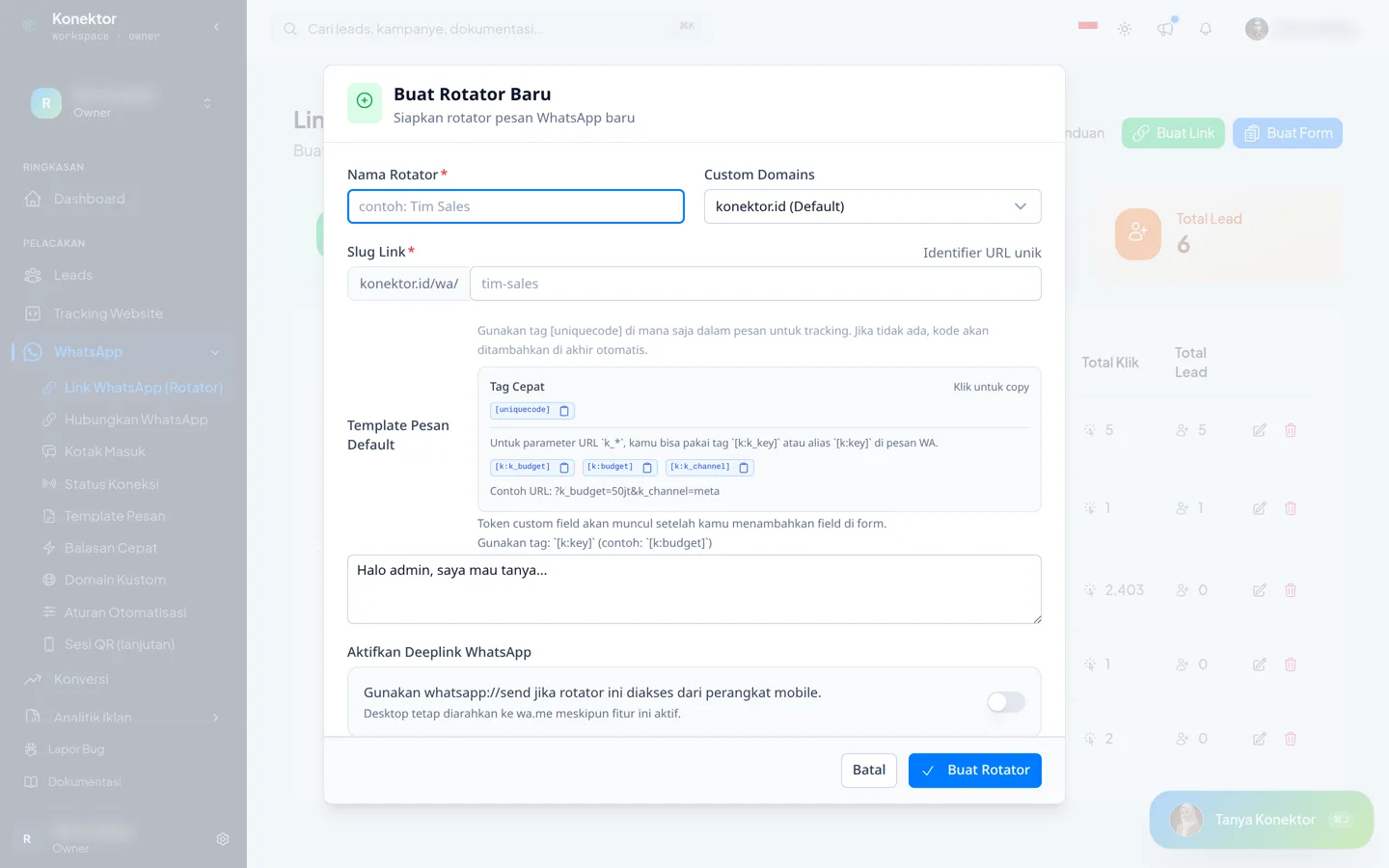 3. Enter a Rotator Name, such as
 Main Sales Team.
4. Enter a Link Slug, such as main-sales.
5. Enter a Default Message Template.
6. Under WhatsApp Numbers, complete the first row: Agent Name, WhatsApp Number, and Distribution Weight.
7. Click Add Number for each additional destination, then complete the new row.
8. Click Create Link.
Without a connected number, Konektor records clicks but does not record chats. Click Connect a number on the form to connect a number in Numbers & CTWA.
A slug can contain lowercase letters, numbers, and hyphens. Use a recognizable name that does not contain a phone number or customer data.
Set distribution weights
A weight controls the chance that a number is selected. It does not guarantee a fixed number of chats.
| Goal | Example weights |
|---|---|
| Equal distribution across two numbers | 50 and 50, or any other equal values. |
| A primary agent receives more traffic | 80 for the primary agent and 20 for the backup. |
| Equal distribution across three numbers | Give all three the same value. |
Konektor can also keep a returning visitor with the previously selected number while that number remains active. For this reason, a few clicks from one browser might not represent the overall distribution.
Split new visitors
On a link with two or more numbers, open How new visitors are split.
| Pattern | Result |
|---|---|
| Click chance | New visitors are drawn by weight. This is the default. |
| Catch up visitor share | The number whose new visitors are still below its weight share is chosen more often. |
| Catch up chat share | The number whose visible incoming chats are still below its share is chosen more often. A chat counts only when that number's session is connected in Konektor. |
| Only numbers with visible chats | New visitors go only to numbers with a connected session. If none qualify, every active number stays in use. |
| Custom | Choose the draw, the counter, visitor memory, and how a new number joins. |
In the table, each number shows its share, total clicks, visitors this period, and chats this period.
Chat not yet visible in Konektor means the session of that number is not connected. Konektor does not know the chat count for that number.
Total Clicks stays the count for all time. A new period starts when the way to choose, what is counted, or the visible-chat rule changes. It also starts when you press Start a new count. A change to a weight does not start a new period.
Leave New visitors per day empty for no cap. When every number has reached its cap, the link still opens one of the active numbers.
A newly added number starts even with its weight share, unless you choose Catch up from zero under Custom.
Set the opening message
Write a message that helps the agent understand the prospect's intent, for example:
Hello, I would like to ask about the Business Plan.
Konektor adds a visitor code to help with matching. To control its position, include the [uniquecode] tag once in the Default Message Template.
Copy and test the link
- Find the new link.
- In the Direct row, click the icon titled Copy Link. The Open link button opens the link and counts it as a click.
- Send the link to yourself.
- Open it on a phone.
- Confirm that WhatsApp opens one of the registered destination numbers.
- Confirm that the opening message is correct.
- Return to WhatsApp Links and check Total Clicks and Total Leads.
The WhatsApp Link is ready to share when the link opens WhatsApp with the correct number and message. Previews from bots or some apps might not count as a human visit.
Test distribution correctly
Use several browsers or private windows to test a new distribution. Repeated tests in the same browser can return to the previously selected agent.
Replace old WhatsApp links
Use the WhatsApp Link on the website button, bio, landing page, or ad that you want to measure. For a landing page button, you must use the Direct link, not a wa.me link. You do not need to replace every wa.me link at once. Start with one page or campaign, then test before expanding.
The way the visitor code in this link connects a chat to an ad click is explained in LPWA ads tracking software.
If you also want to track a website, install the tracking script, open one website page, and confirm that the activation panel receives a real event. Ad-platform delivery is optional: add a platform under Website Tracking, then use Test send. A working WhatsApp Link does not prove that website tracking or platform delivery is working.
Alternative: show a form before WhatsApp
Click Create Form if you need to request information before opening WhatsApp. Name and phone number are core fields; email and custom fields can be added when needed.
Collect only data that you genuinely need and explain its purpose to visitors. See the Lead Capture Form Guide for setup details.
After saving the form, the WhatsApp Links page shows two link types:
- Direct opens WhatsApp immediately. Put this link on your landing page button.
- Form shows the form first, then opens WhatsApp.
Test the correct link type before using it in an ad.
WhatsApp deeplink
Enable WhatsApp Deeplink attempts to open the WhatsApp app directly on a mobile device. Desktop traffic continues to use the web link.
Test the deeplink on the devices and browsers your audience uses. Some in-app browsers restrict app opening, so the regular link can be more consistent.
Change team members
Use Edit Rotator to update a number, agent name, message, or weight. Test the link again after the change.
Do not create a new slug only because a team member changed. Keeping the same link avoids replacing URLs across every campaign.
FAQ
Q: Can the same visitor always be routed to the same agent (sticky)? A: Yes. The WhatsApp Link remembers the agent that previously received that visitor through a visitor code stored in a browser cookie for one year. As long as that agent's number stays active, later visits from the same visitor go to the same agent instead of a fresh draw. The visitor code is stored per workspace, so this does not affect a link in another workspace.
Troubleshooting
| Symptom | What to check |
|---|---|
| Create Link becomes an upgrade prompt | The plan's WhatsApp Link limit has been reached. Check the plan or remove an unused link. |
| The slug is rejected | Use at least three characters with lowercase letters, numbers, and hyphens. Choose another slug if it is already used. |
| A number is rejected | Use international format without +, spaces, or hyphens, such as 62812.... |
| The link opens an unexpected number | Check active numbers and weights. Test in a private window so the previous selection is not retained. |
| The opening message is wrong | Edit the Default Message Template, save, and copy the link from the dashboard again. |
| The click total does not increase | Open the link as a user instead of only through a social preview or crawler. Wait briefly and reload the page. |
| An ad platform does not receive the test event | Fix the configuration under Website Tracking and use Test send. A QR code or device session does not fix ad platform delivery. |
Related guides
Need More Help?
Our team is ready to help you maximize ad tracking and business attribution.
Wulan answers your questions and sends tutorial videos. Session scheduling is available through Wulan if you still need it.
© 2026 Konektor. All rights reserved.