
Turn on Meta automatic events for CTWA
Meta can spot a lead or a purchase in a WhatsApp chat that came from an ad. Konektor reports that event to Meta for you. Konektor reports it only when your team did not already report the same event for the same lead.
This feature needs two switches. One is in Konektor. One is in Meta. If one is off, no event is sent.
Before you start
- Your number is connected to CTWA with Login with Meta. See Set up Meta CTWA with Meta login.
- You added the number through Konektor with Meta login. Numbers added through another provider do not send this event.
- You are the owner of the Konektor workspace. You are also an admin of the business in Meta.
- Your business is not in the European Union, the United Kingdom, or Japan. Meta does not offer this feature there.
Step 1: turn on the switch in Konektor
- Open Tracking & Ads > Conversions > Conversion Settings.
- Find the Meta automatic events section. The Needs a step in Meta badge marks it.
- Turn on Report events Meta detects.
If the switch is off and gray, read the reason under it. Usually the CTWA number is not yet connected with Login with Meta, or you are not the owner.
Step 2: turn on automatic events in Meta
Do this in the business portfolio that owns the WhatsApp Business account. A partner portfolio does not show this setting.
- Open Meta Business Suite. Select the business portfolio that owns the WhatsApp account.
- Open Settings > Accounts > WhatsApp accounts. Do not choose Messaging accounts.
- Click the row of your WhatsApp number.
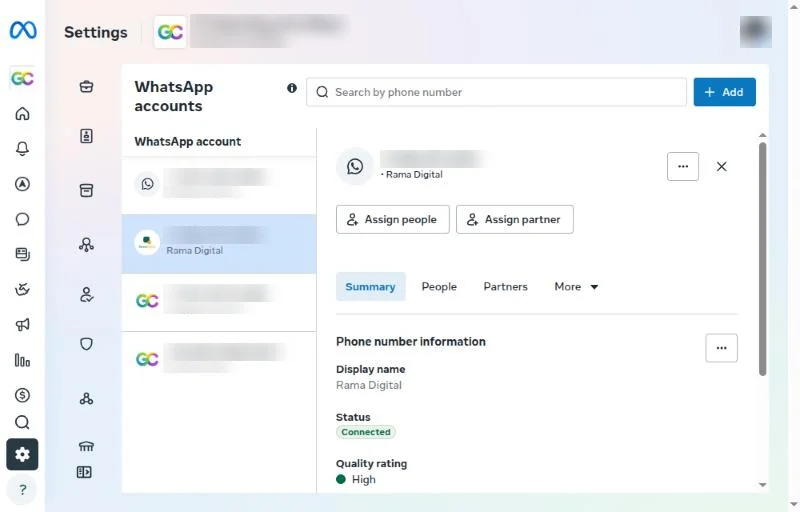
- Stay on the Summary tab. Scroll the detail panel down to Privacy and data sharing.
- Turn on Automatically identify order, lead & other events from conversations in this account.
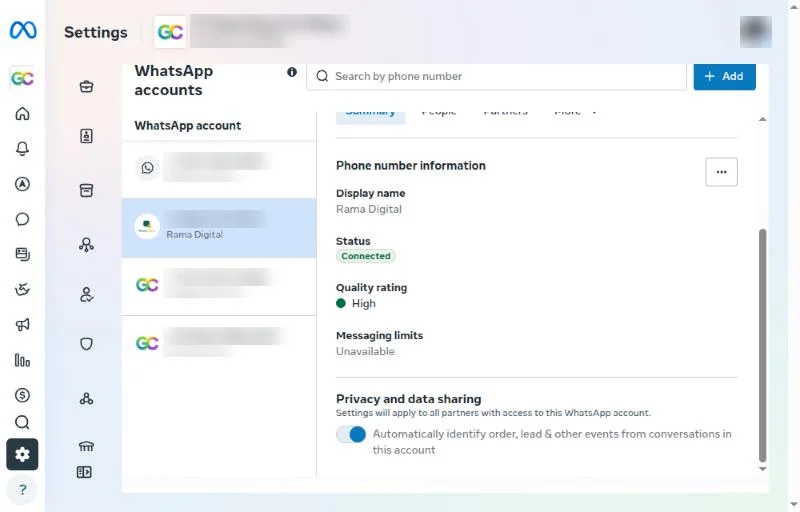
Meta states that this setting applies to all partners that have access to that WhatsApp account. Menu names in Meta can change.
Shortcut: the notice in WhatsApp Manager
Some businesses see a notice in WhatsApp Manager > Overview > Alerts. Click See more if the notice is hidden. Find Instruct Meta to turn on automatic events to stay up to date with your conversations?, then click Turn on. Meta states that this applies to all WhatsApp Business accounts in your business.
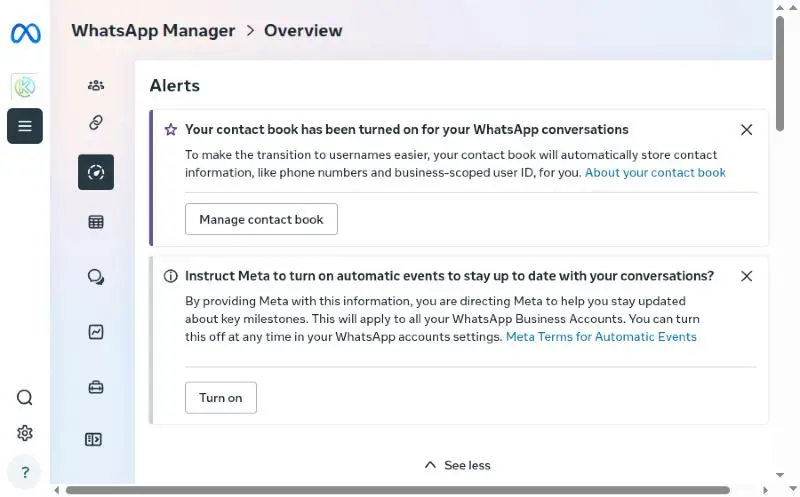
The result is the same as turning on the switch in Privacy and data sharing. You can turn it off at any time there.
How to confirm it works
- Wait for a new chat from a Click-to-WhatsApp ad that shows interest or a purchase.
- Open Tracking & Ads > Conversions > Conversion Settings.
- Open the Delivery log.
- Look for a Meta row with the status Sent.
Meta sends the event after it analyzes the chat. This is not instant. Events from old chats are not sent again.
Common problems
The switch or the notice does not show in Meta
Check four things:
- Your business is not in the European Union, the United Kingdom, or Japan.
- You added the number through Konektor with Meta login.
- You opened the business portfolio that owns the WhatsApp account, not a partner portfolio.
- You are signed in as an admin of the business that owns the WhatsApp account.
If all four are true, contact Konektor support.
The switch in Konektor is off
Connect the CTWA number with Login with Meta first. Only the workspace owner can change the switch.
No event in the Delivery log
- Make sure both switches are on.
- Make sure the chat came from a Click-to-WhatsApp ad.
- If your team already reported that event for the same lead, Konektor does not send it again.
Customers on another provider
Customers who connect WhatsApp through another provider do not get this event from Konektor.
Related guides
Need More Help?
Our team is ready to help you maximize ad tracking and business attribution.
Wulan answers your questions and sends tutorial videos. Session scheduling is available through Wulan if you still need it.
© 2026 Konektor. All rights reserved.